
A couple of weeks ago, I wrote about RubyDoc.info, a "good looking, up-to-date Ruby documentation" site powered by YARD. Well, as of YARD 0.6 you can get the same greatness that RubyDoc.info provides applied to your local machine's collection of gems in just a few steps. Try it out - you won't regret it.
Step 1: Install YARD. Install the yard gem with sudo gem install yard or similar.
Step 2: Run the YARD server. Run yard server --gems. Take note of the hostname and port given in the output.
Step 3: Get browsing. Visit http://0.0.0.0:8808/, where the IP address and port should be replaced with those provided by the YARD server. This URL should work for most of you though.
How does it look? Here's the overall view of all installed gems:
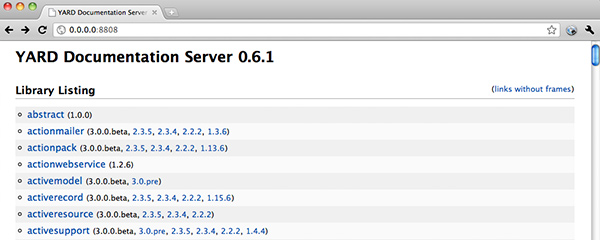
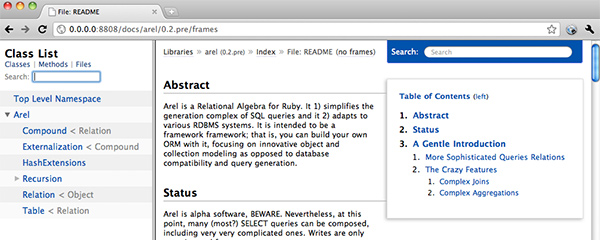
And here's a specific gem's documentation:
There's a lot more to YARD than merely serving up documentation - it's primarily a tool for generating it from both RDoc and YARD-enhanced RDoc formats. Learn more at Loren Segal's YARD 0.6.0 release post or from the GitHub project.
Comments
Mitko Kostov ·
Yard is great. May be you should add $yard gems --rebuild in order to rebuild the documentation of the already installed gems
Martijn ·
That's pretty cool, guess I can drop the --no-rdoc from my .gemrc now :)
Jan Wedekind ·
The new reload feature of the YARD server is really neat for doing development.
yard server --reload
Ricardo Otero ·
Nice! This saved my day!
Grant Hollingworth ·
I made a rackup file so you can run the YARD gem server in any Rack-based server, including Passenger. With Passenger Preference Pane, that makes it pretty easy to use gems.local instead of an awkward IP and port.
http://gist.github.com/562448
robgleeson ·
I thought I'd mention that YARD supports the markdown & textile markup languages too, and not just SimpleMarkup(RDoc).
The YARD meta tags help you write better documentation too, and I hope everybody starts to use them =)
Jeff Schoolcraft ·
Here's how you get it in all your rubies if you're using RVM: http://jschoolcraft.posterous.com/the-3-step-guide-to-slick-local-documentation
Sam ·
0.0.0.0 is a network address. Do macs not have a loopback address (127.0.0.1) ?
Lailson Bandeira ·
I'm the only one who prefers SDoc? O.o
http://railsapi.com/
Peter Cooper ·
Sure, that works too.
crash zone ·
yard really does look good. Is there anything comparable to python's sphinx documentation generator in ruby world.
Alexander Shamne ·
That's an awesome gem, for sure it'll help a lot
will ·
You'll probably find http://localhost:8808 works better ...